


A $0 billing plan gives an athlete an active package without charging them for it. Attending a class requires an active package, so a free membership still needs a package behind it. Since a package can carry more than one billing plan, you can add a $0 plan to any existing package and apply that plan to the athletes who should not be billed.
Watch the video below for a walkthrough, or read on for the full guide.
What you can do with $0 billing plans
Give coaches and staff access without charging them
Cover non-paying family members on a single household payment
Add a new membership type or class at no additional charge
Keep athletes on the schedule and in your reporting while they pay nothing
Use an existing package rather than building a separate free one
Add a $0 billing plan to a package
You do not need a special free package. Add the plan to the package the athlete should be on.
Go to Products → Packages.
Click the package name, then Edit Package.
In the Billing panel, add a new billing plan.
Give it a Plan Name that makes the purpose obvious, such as Staff or Family Included.
Set the Total Price to 0.
Set the # of Installments to 1.
Click Save on the plan.
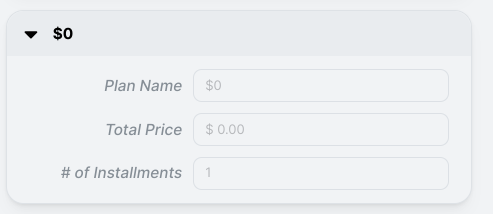
The plan now appears alongside the paid plans whenever you apply that package to an athlete. Select it for the people who should not be charged, and the paid plan for everyone else.
Payment method and AutoPay on a $0 plan
A $0 plan does not generate invoices, and those invoices still have a payment method attached.
You can set the payment method to Cash or Check, or to a card. If you choose Cash or Check, AutoPay must be off.
Setting a card as the payment method with AutoPay on means the $0 invoices clear on their own with nothing to charge. It saves your team from manually collecting invoices that are worth nothing.
Frequently asked questions
Do I need to create a separate free package?
No. Add a $0 billing plan to the package the athlete should be on. Packages carry multiple billing plans, so the same membership can cover paying and non-paying athletes with no duplicate packages to maintain.
Why does a free membership need a package at all?
Attending a class requires an active package. Without one, the athlete cannot reserve or check in, and their attendance will not show in your reporting. A $0 plan gives them access without the charge.
Do $0 invoices still get created?
No. No invoice will be generated for free memberships.
Can I switch someone from a paid plan to a $0 plan later?
Yes, by changing their package and billing plan. The billing plan is selected when the package is applied, so moving someone onto the free plan follows the same path as any other package change.
Helpful tips
Name $0 plans for the reason they exist, such as Staff, Coach, or Family Included. The name is internal only, and it is what your team will search for later.
Add the $0 plan to the package the person would otherwise be on. Keeping free and paid athletes on the same package keeps attendance reporting honest.
Review who is on a $0 plan periodically. Free memberships tend to outlive the reason they were granted.
Use a $0 plan rather than skipping the package entirely. An athlete without an active package cannot reserve or check in.
When $0 billing plans are most helpful
Coaches and staff who train at the gym for free
Running a free community or partner program alongside paid memberships
Track non-paying members
If you have questions about $0 billing plans in Kilo GMS, our Support team is happy to help. Reach us at hello@usekilo.com.