


A drop-in or single-session package sells one session at a time for visitors, guests, and athletes who train occasionally. You do not need a separate package for every event you offer. How you build it depends on one question: will the athlete book the session themselves, or will your team book it for them?
Watch the video below for a walkthrough, or read on for the full guide.
What you can do with drop-in packages
Sell a single session of a class or appointment
Limit a drop-in athlete to the one class type they paid for
Group several appointment types into one single-session package
Price each event differently using multiple billing plans on the same package
Set a validity period so an unused session does not sit open indefinitely
Drop-ins for classes athletes book themselves
When athletes reserve their own spot in the Kilo app, the package controls what they can reserve. That makes a separate drop-in package per class type worth the extra setup, because a drop-in who paid for CrossFit should not be able to book themselves into Boot Camp.
Build one package per class type, each with:
A single attendance rule covering only that class type
Attendance set to 1 session as a pack
Athlete Status set to Visitor on start, with no status change on end
Auto Renew off
A validity period of your choosing
One billing plan, priced at what a single session of that class costs
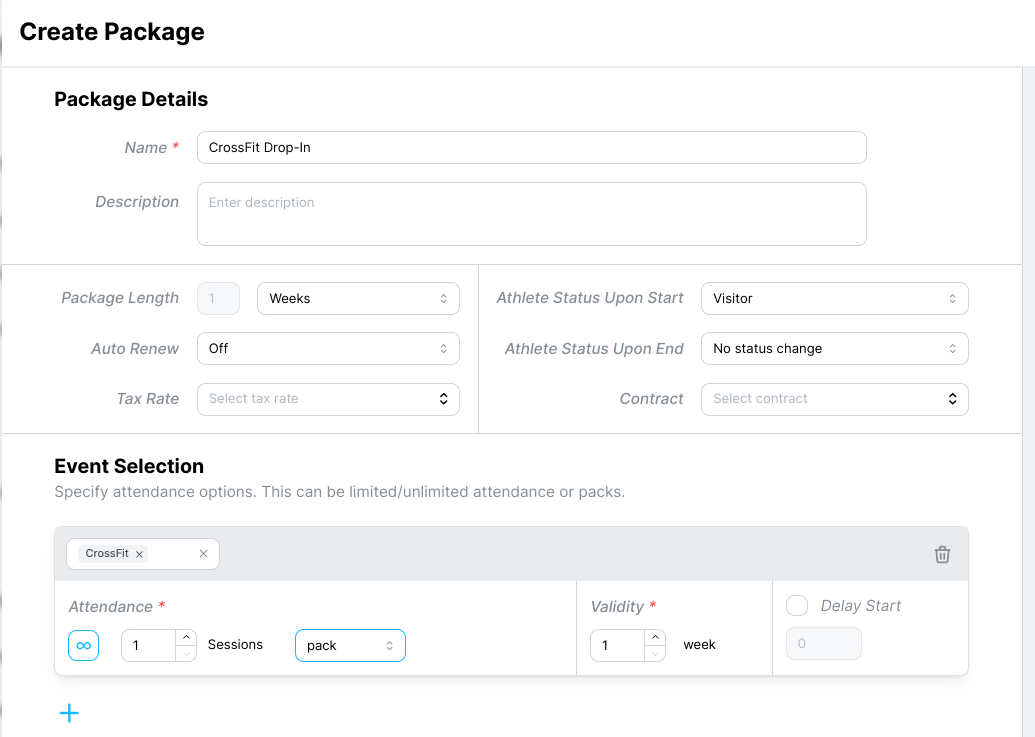
Repeat for each class type you sell drop-ins for.
Single sessions for appointments you book
Appointments are different, because athletes are not self-booking them on the calendar. Your team schedules those, so there is no risk of someone reserving the wrong thing. That means you can save yourself a pile of duplicate packages.
Build one single-session package that covers all of your appointment types:
One attendance rule listing every appointment event type, such as personal training, semi-private, and bodybuilding
Attendance set to 1 session as a pack
Auto Renew off
A validity period of your choosing
One billing plan per event type, each priced at what a single session of that event costs
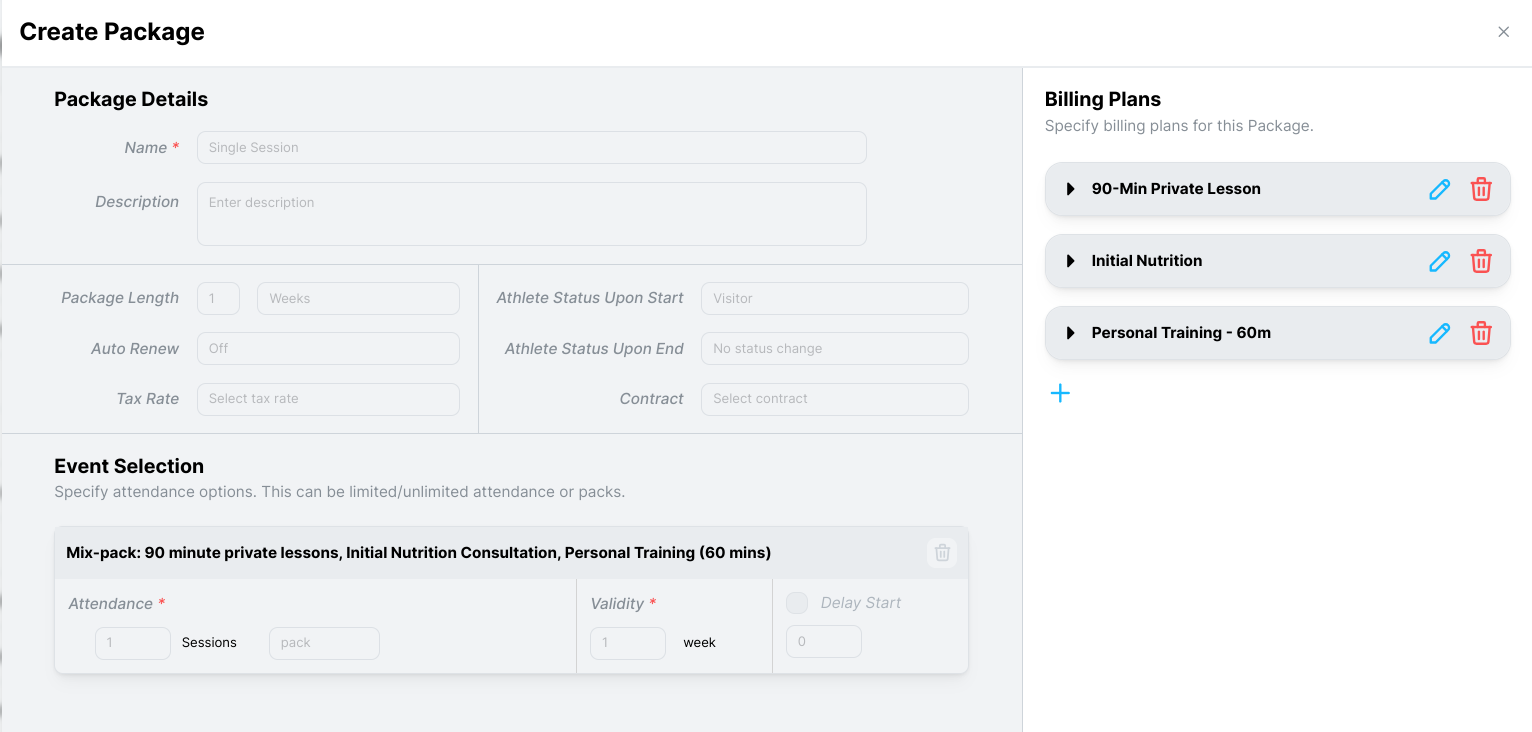
When you apply the package to an athlete, pick the billing plan that matches the session they are buying. A single personal training session and a single bodybuilding session use the same package and different plans.
Which approach should you use?
Question | One package per event | One package, many billing plans |
|---|---|---|
Who books the session | The athlete, in the Kilo app | Your team |
Best for | Classes | Appointments |
Risk it prevents | Booking into a class they did not pay for | None needed, since staff control the booking |
Setup effort | Higher, one package per class type | Lower, one package covers everything |
Pricing | One plan per package | One plan per event type |
The deciding factor is whether the athlete can book for themselves. If they can, the package has to fence them in. If they cannot, grouping saves you the work.
Frequently asked questions
Do I need a separate package for every drop-in I sell?
Only for classes athletes book themselves. For appointments your team schedules, one package with a billing plan per event type covers everything.
How do I stop a drop-in athlete from booking the wrong class?
Build the package with a single attendance rule covering only the class they paid for. The package controls what they can reserve in the Kilo app, so a CrossFit drop-in package will not let them into Boot Camp.
How do I charge different prices for different single sessions?
Add one billing plan per event type to the same package. Select the right plan when you apply the package, and the athlete is charged for the session they actually bought.
What status should a drop-in athlete get?
Visitor on start, with no status change on end works for most gyms. It keeps drop-ins distinguishable from members in your reporting, and leaves their status alone when the session is used.
Should a drop-in package be time-based or credit-based?
Time-based if you want the unused session to expire, credit-based if you do not. A time-based 1-session pack with a validity period closes itself out after a set stretch. A credit-based 1-session pack stays open until the athlete actually attends.
Should drop-in packages auto renew?
No. Turn Auto Renew off. A drop-in is a single purchase, and renewing it automatically charges someone who only meant to visit once.
Helpful tips
Decide the self-booking question first. It determines the whole build.
Put the event name in the package name for class drop-ins, since athletes see it in the Sales Portal.
Name billing plans by event for the grouped appointment package, because your team is picking from that list at the point of sale.
Set a validity period you can live with. An open-ended single session can sit unused for a year and still be redeemable.
Confirm which session the athlete is buying before you choose the billing plan. The package will not catch a mismatch for you.
When drop-in packages are most helpful
A visiting athlete in town for a few days
A guest attending with a member
Selling a one-off personal training session to someone without a package
Trying a specialty class before committing to a membership
Occasional athletes who train too infrequently for a monthly membership
If you have questions about drop-in and single-session packages in Kilo GMS, our Support team is happy to help. Reach us at hello@usekilo.com.