


An uncredited reservation is a class reservation or appointment that isn't backed by a credit from one of the athlete's packages. Staff and admins can create one on purpose, for example to book an athlete who doesn't have a package yet, and Kilo GMS also creates them when a reservation is made after an athlete's credits are used up. Athletes can't create uncredited reservations for themselves in the Kilo app.
An uncredited reservation holds the athlete's spot in the class or appointment, but the athlete can't be checked in until the reservation is credited.
What you can do with uncredited reservations
Reserve an athlete for a class when they don't have an available credit
Book a one-time or recurring appointment for an athlete without a package
See how many uncredited reservations your gym has from the Dashboard
Find an athlete's uncredited reservations on their profile
Assign a credit to an uncredited reservation by hand
Reserve an athlete for a class without a credit
Go to Calendar → Scheduling.
Click the class.
Open the Reservations tab.
Click + Reserved Athlete and select the athlete.
Read the warning. When the athlete has no available credit, Kilo GMS shows: The athlete does not have an available credit for this class. This reservation will be uncredited.
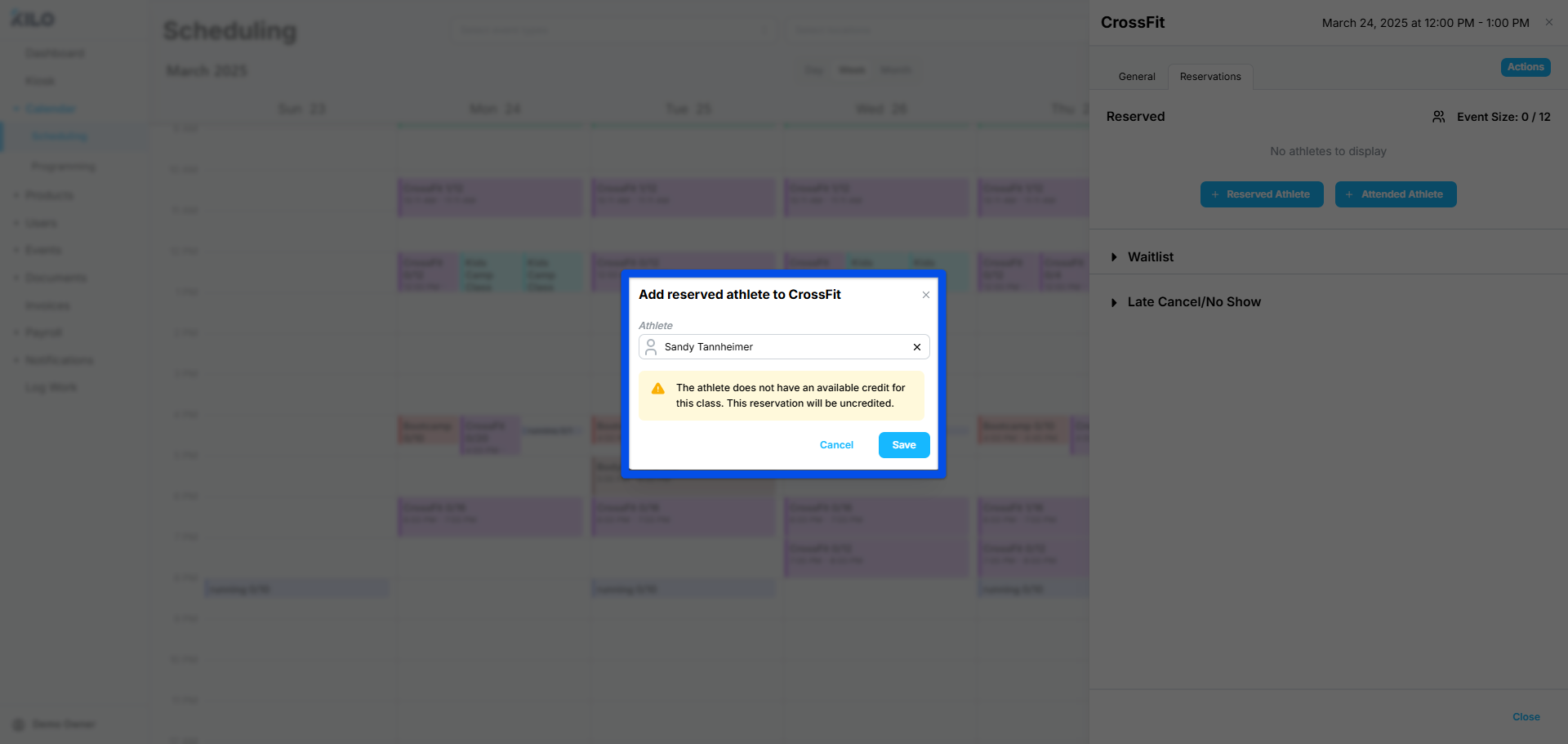
Click Save to create the uncredited reservation, or Cancel to go back.
Bulk Reservation doesn't show this warning. After reserving an athlete in bulk, check their Reservations tab for any reservations that were made without a credit.
Book an appointment without a credit
Go to Calendar → Scheduling.
Click the calendar to add a new appointment.
Select the athlete.
Set the start date and time.
For a recurring appointment, toggle over to Recurring Event. Select the cadence of the appointment.
Click Save.
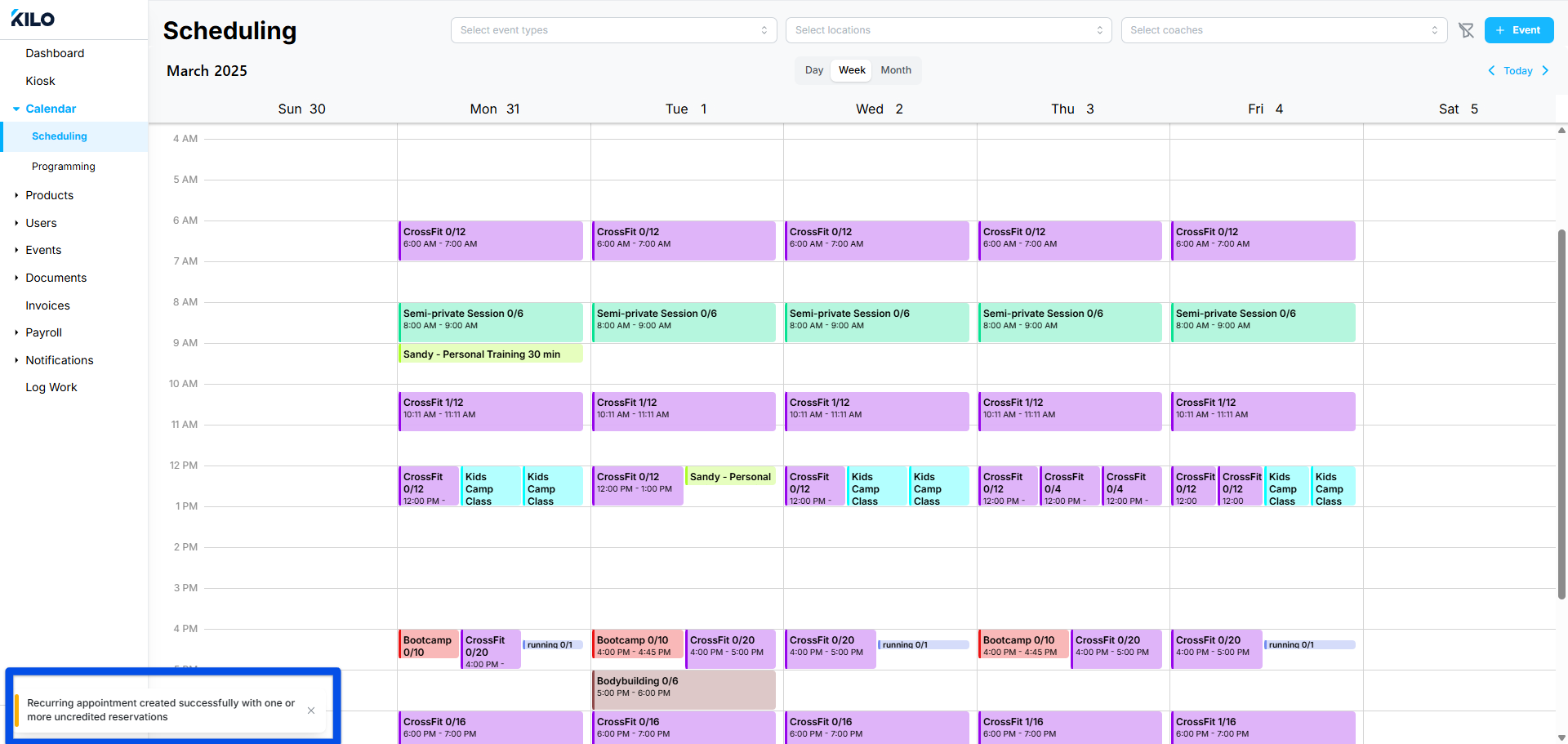
If any of the appointments aren't covered by a credit, a confirmation message reads: Appointment created successfully with one or more uncredited reservations.
How do I find uncredited reservations?
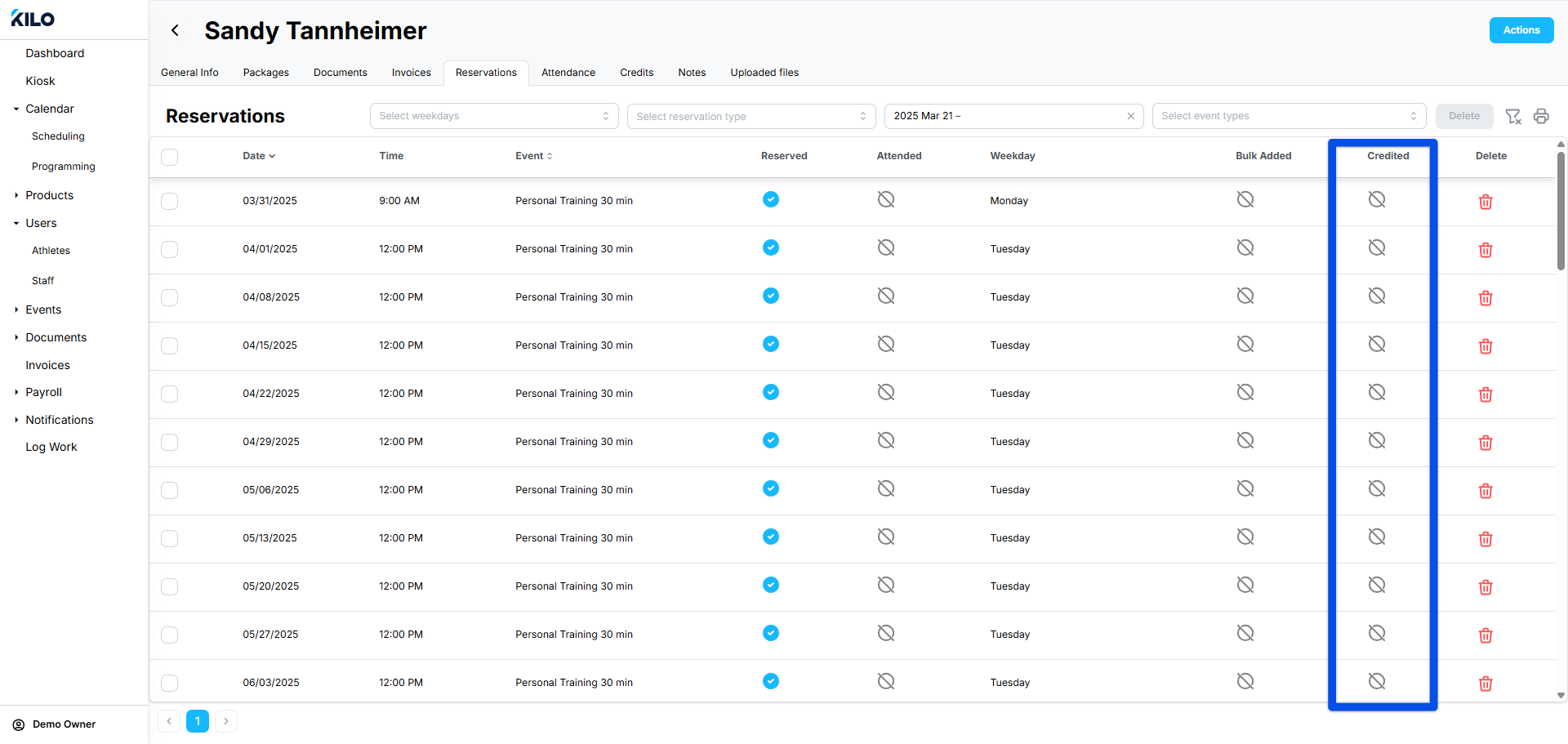
For a gym-wide count, check the Reservations tile on your Dashboard. For a specific athlete, check the Credited column on their Reservations tab.
Total Uncredited Reservations in the Reservations tile on your Dashboard shows how many uncredited reservations your gym has.
To find a specific athlete's uncredited reservations:
Go to Users → Athletes and open the athlete's profile.
Select the Reservations tab.
Check the Credited column. A crossed-out circle marks a reservation without a credit.
 Note
NoteA package's Credit Usage counter and its Attendance tab count credited reservations only. To find uncredited reservations, use the athlete's Reservations tab.
How does an uncredited reservation become credited?
Kilo GMS credits it automatically overnight when a matching credit is available, or you can assign the credit yourself at any time.
Automatically. Each night, Kilo GMS assigns available credits to uncredited reservations in chronological order, for reservations within 30 days. The credit has to come from a package that includes that class or appointment type, with validity dates that cover the reservation.
By adding a package. If the athlete has no package, apply one that includes the class or appointment credits they need and whose start and end dates cover the uncredited reservations. Once the credits exist, they're assigned overnight or by hand.
By hand. To assign an available credit right away:
Open the athlete's profile and select the Reservations tab.
Find the reservation with the crossed-out circle in the Credited column.
Click the crossed-out circle. The credit is assigned and the circle changes to a check.
Hovering over a credited reservation's check shows Remove credit. Clicking it takes the credit off that reservation and returns it to the package.
If the athlete has a package but all of its credits are already allocated, see Manage Package Credits for how to free one up.
Frequently asked questions
Can athletes book uncredited reservations themselves?
No. Only staff and admins can create uncredited reservations. When an athlete has no available credit, they can't reserve the class in the Kilo app.
Why can't I check an athlete in to their reservation?
The reservation is most likely uncredited. Check the Credited column on the athlete's Reservations tab, then assign a credit before check-in.
I added a package, so why is the reservation still uncredited?
Credits are assigned overnight for reservations within 30 days, so the reservation may not be credited yet. Assign the credit by hand from the Reservations tab if you don't want to wait. If it still won't credit, confirm that the package includes that class or appointment type and that its validity dates cover the reservation date.
Why doesn't the package show the uncredited reservation?
Packages count credited reservations only. An uncredited reservation isn't drawing on any package yet, so it appears only on the athlete's Reservations tab.
Helpful tips
Read the uncredited warning before saving a staff reservation, and plan how the athlete will get a credit before that class
Check Total Uncredited Reservations on your Dashboard regularly so uncredited reservations get resolved before athletes arrive
Apply packages with start and end dates that cover any reservations you booked ahead of time
Assign credits by hand for same-day reservations, since automatic assignment runs overnight
If you have questions about uncredited reservations in Kilo GMS, our Support team is happy to help. Reach us at hello@usekilo.com.