


A follow-up package is the package an athlete moves into when their current one finishes. It is how a trial, an intro offer, or an On Ramp converts into a standing membership without anyone remembering to do it manually. Set it on the package so every athlete who buys it converts the same way, or set it at the point of sale for one athlete.
The one thing to know before you start: a follow-up package is only available when Auto Renew is off. A package either renews into itself or rolls into a different one.
What you can do with a follow-up package
Convert a trial, intro, or On Ramp into an ongoing membership automatically
Choose the follow-up package and its billing plan
Have the follow-up appear on the athlete's account straight away, scheduled to start when the current package ends
Set the follow-up on the package itself, or per athlete at the point of sale
Set a follow-up package in the builder
Build a Time-based Package as usual.
Set Auto Renew to Off.
Check Include Follow-up Package.
Choose the package the athlete should move into.
Finish building and save.
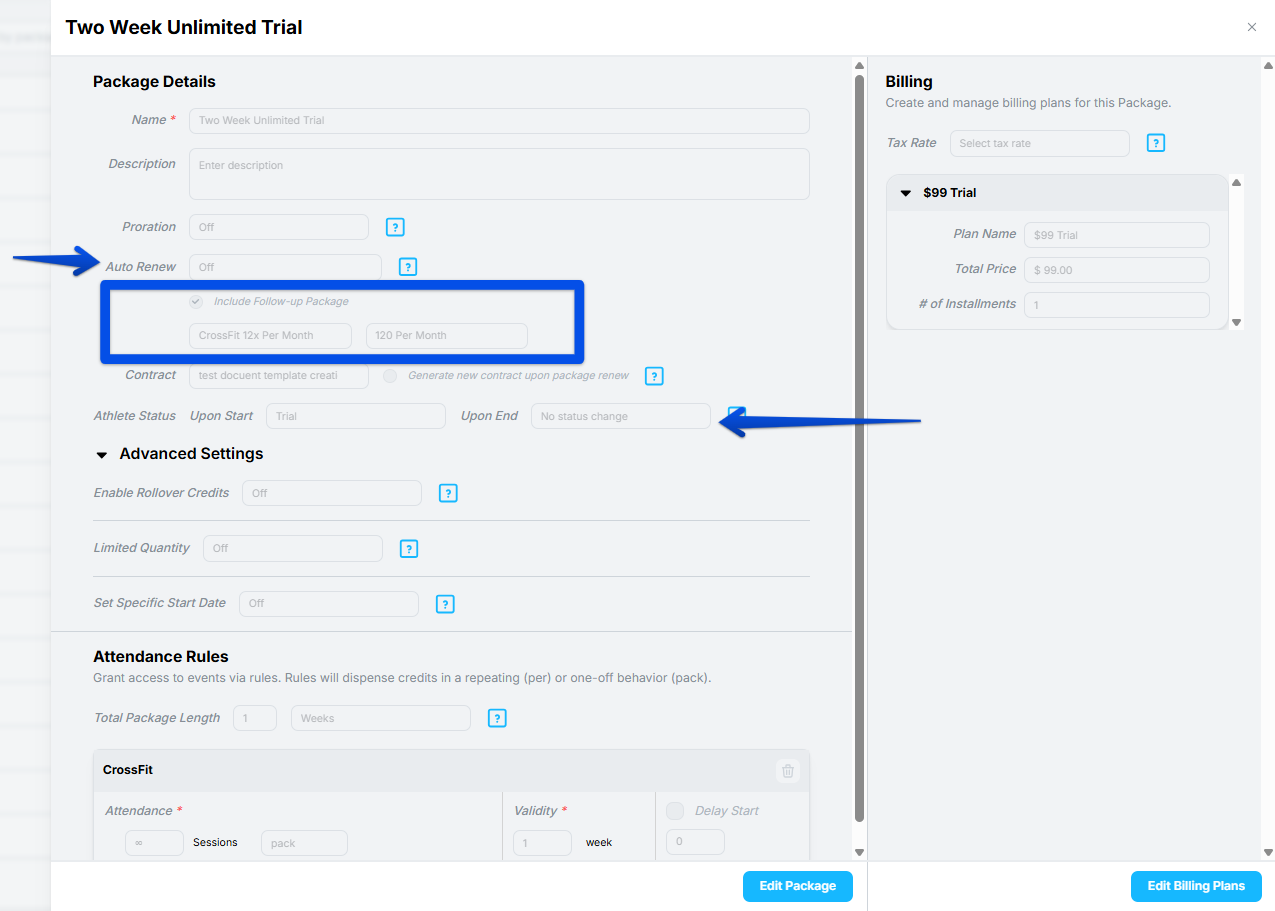
Every athlete who buys this package will be set up to convert into the follow-up when their term ends.
Set a follow-up package at the point of sale
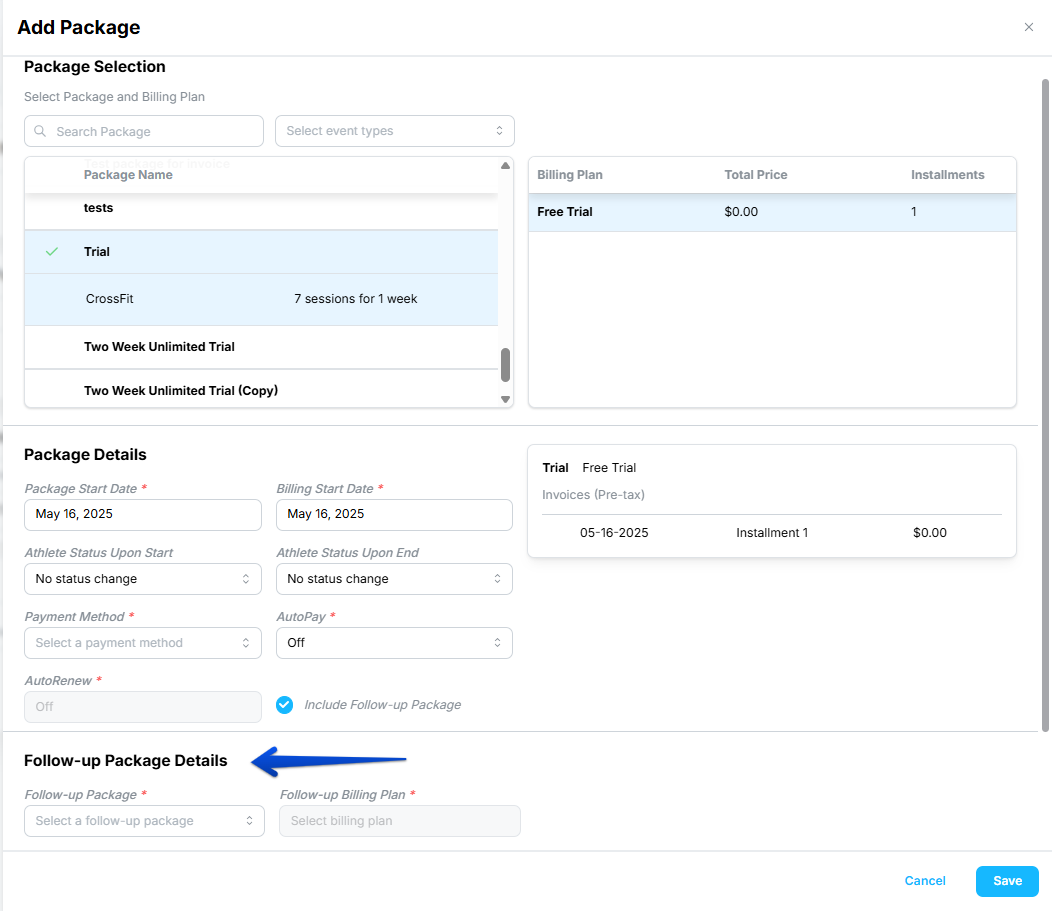
You can also decide the follow-up when you apply the package to a specific athlete, which is useful when different athletes should convert into different memberships.
Open the athlete's profile and add the package.
Check Include Follow-up Package.
Choose the follow-up package and its billing plan from the dropdowns.
Finish applying the package and save.
What happens after you save
The follow-up package is added to the athlete's account immediately, in an Upcoming state. It does not wait until the current package is nearly over.
Its start date is set to line up with the end date of the current package.
It inherits its own renewal settings from the package it was built from, so a follow-up that is itself set to auto renew will keep renewing after it activates.
Kilo activates it automatically when the current package expires.
Because the upcoming package is visible from the moment you save, you and the athlete can both see what they are converting into and when.
Proration is not supported on follow-up packages. If your follow-up is a monthly membership that bills on the first, the follow-up will not prorate its first payment.
Frequently asked questions
Why is Include Follow-up Package greyed out?
Auto Renew is on. A package can renew into itself or roll into a different package, not both, so the follow-up option only becomes available with Auto Renew off. Turn Auto Renew off and the checkbox becomes available.
When does the follow-up package appear on the athlete's account?
Immediately, in an Upcoming state. It is created the moment you save, with a start date matching the end of the current package, and it activates on its own when that package expires.
Does the follow-up package renew after it activates?
That depends on how the follow-up package itself is built. It inherits the renewal settings of its own template, so a follow-up set to auto renew will keep renewing once it takes over.
Can I set a different follow-up for one athlete?
Yes. Choose it at the point of sale instead of on the package. This lets you send one trial athlete into an unlimited membership and another into a smaller pack, using the same trial package for both.
Can I use proration on a follow-up package?
No. Proration is not supported on follow-up packages. If the first payment on the follow-up needs to be prorated, that has to be handled another way.
What is the difference between a follow-up package and changing an athlete's package?
A follow-up is scheduled in advance and happens on its own; changing a package is something you do when an athlete's plans change. Use a follow-up for a conversion you expect from the start, such as a trial converting to a membership. Use Change Package for upgrades and downgrades decided later.
Helpful tips
Build the follow-up package first. You cannot select it until it exists.
Set the follow-up on the package when everyone converts the same way, and at the point of sale when they do not.
Turn Auto Renew off before you look for the checkbox. It is the single most common reason people cannot find this setting.
Tell the athlete what they are converting into and when, at the point of sale. The upcoming package is already visible on their account, so there is nothing to look up later.
Check the follow-up package's own renewal settings. It behaves according to its own template once it takes over.
When a follow-up package is most helpful
Converting a 1-week or 2-week trial into a standing membership
Moving On Ramp graduates into your group program automatically
Rolling an intro offer into full-price membership at the end of the promotional period
Running a kickstart or challenge that is meant to lead somewhere
If you have questions about follow-up packages in Kilo GMS, our Support team is happy to help. Reach us at hello@usekilo.com.