


Setting a package or billing plan to Private gives it its own link and hides it from your main Sales Portal page. Only people you send the link to can purchase it, which makes private links useful for exclusive offers, invite-only programs, and special pricing for a specific group.
What you can do with private links
Share a package that only invited buyers can see
Offer a special price on a public package without showing that price to everyone
Send the link by email, text, or from your website
Keep a private offer out of the Kilo app with its own visibility setting
Share a private link
Go to Products → Packages.
Click the action button to the far right of the package, then select Sales Portal Options.
Set Sales Portal Visibility to Private for the package, or open the Billing Plans drop down and set it to Private for a billing plan.
Click Copy URL next to the visibility setting.
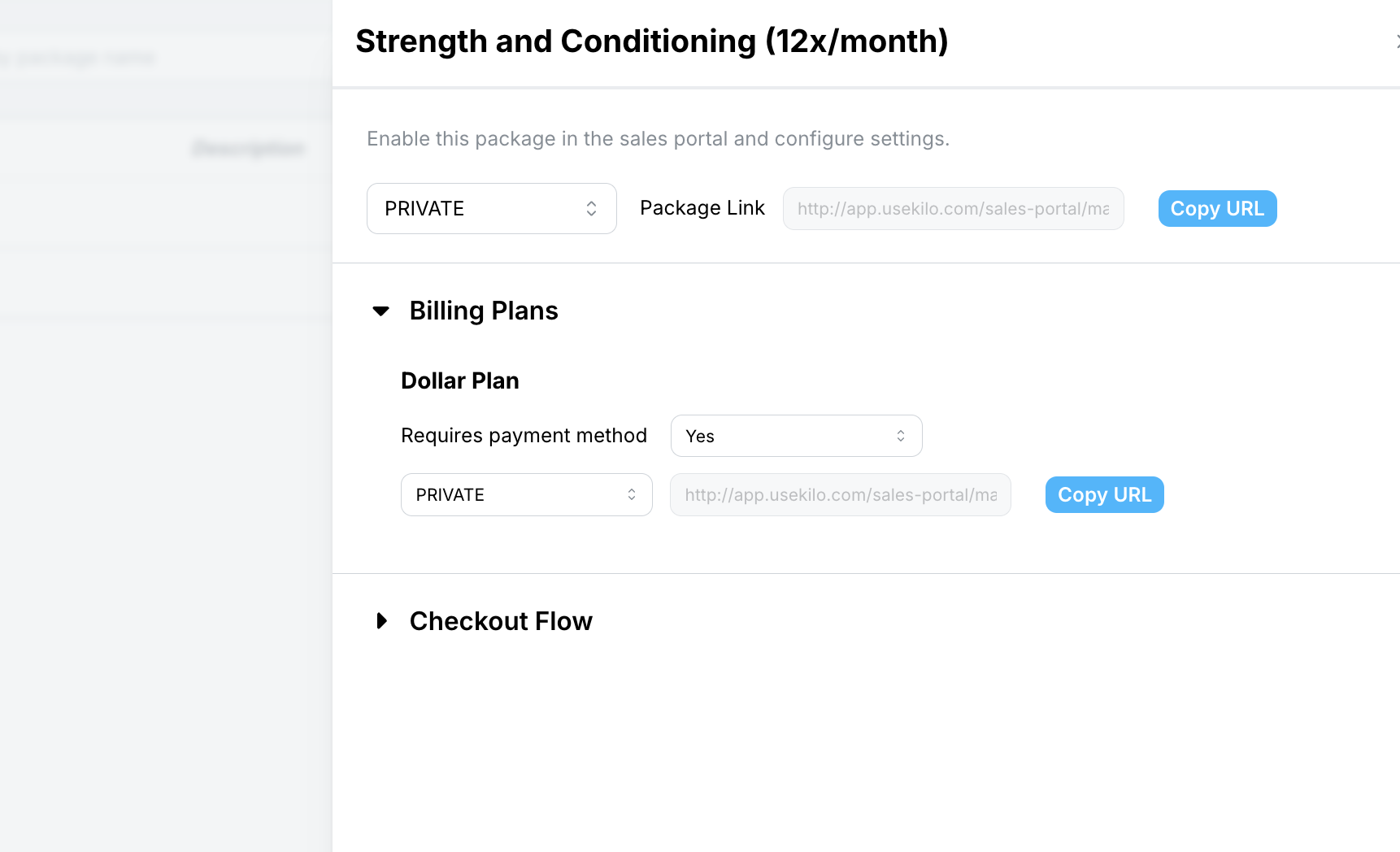
Click Save.
Share the link by email, text, or on your website.
A package link opens the package with a Choose a billing plan window. A billing plan link opens that specific billing plan.
Private package vs. private billing plan: which should you use?
Situation | Make the package private | Make the billing plan private |
|---|---|---|
The whole offer is invite-only | Yes | No |
The package is public, but one price is for a specific group | No | Yes |
Example | A founding member offer you send to a waitlist | A Friends & Family rate on your public Drop-In package |
For example, you may have a Drop-In package with two billing plans: Standard at $25 and Friends & Family at $15. Set Standard to Public, so anyone browsing your Sales Portal sees the $25 option. Set Friends & Family to Private, then copy its link and share it with your coaches' families. Others browsing the portal won't see the $15 option, but anyone with the direct link can check out at that price.
Frequently asked questions
Will a private package show up in the Kilo app?
Only if its Athlete App Visibility is Enabled. App visibility is set separately from Sales Portal visibility. To keep a private offer out of the app, set Athlete App Visibility to Disabled.
Where do I find a private link again later?
Open the package's Sales Portal Options. The link appears next to the visibility setting, and you can click Copy URL again at any time.
Helpful tips
Use a private billing plan for discounted rates instead of applying discounts by hand at checkout.
Name private billing plans clearly, such as Friends & Family or Staff Rate, so your team can tell them apart in reports.
Open the link in an incognito or guest window before sending it to confirm buyers see what you expect.
When private links are most helpful
Offering a friends and family, staff, or referral rate
Running an invite-only challenge or founding member offer
Sending a specific package to a lead after a consultation
Sharing corporate partner pricing with one company's employees
If you have questions about private Sales Portal links in Kilo GMS, our Support team is happy to help. Reach us at hello@usekilo.com.