


Kilo GMS gives you several ways to get an invoice or a receipt into an athlete's hands: send a paid receipt by email from the invoice itself, let athletes open their own invoices in the Kilo app, or notify them by email or SMS through an automation flow. Most gyms end up using more than one, since athletes differ in how they like to keep track of what they have paid.
What you can do with invoice delivery
Email a paid receipt to an athlete directly from Kilo GMS
Let athletes view, send, and pay their own invoices in the Kilo Members app
Send a receipt automatically by email or SMS whenever a payment succeeds
Notify athletes ahead of an upcoming invoice through an automation flow
How do I send a receipt to an athlete?
Paid receipts go out from the invoice itself, straight to the email address on the athlete's profile.
Go to Invoices.
Find the invoice and click the blue action tab.
Click Send Receipt.
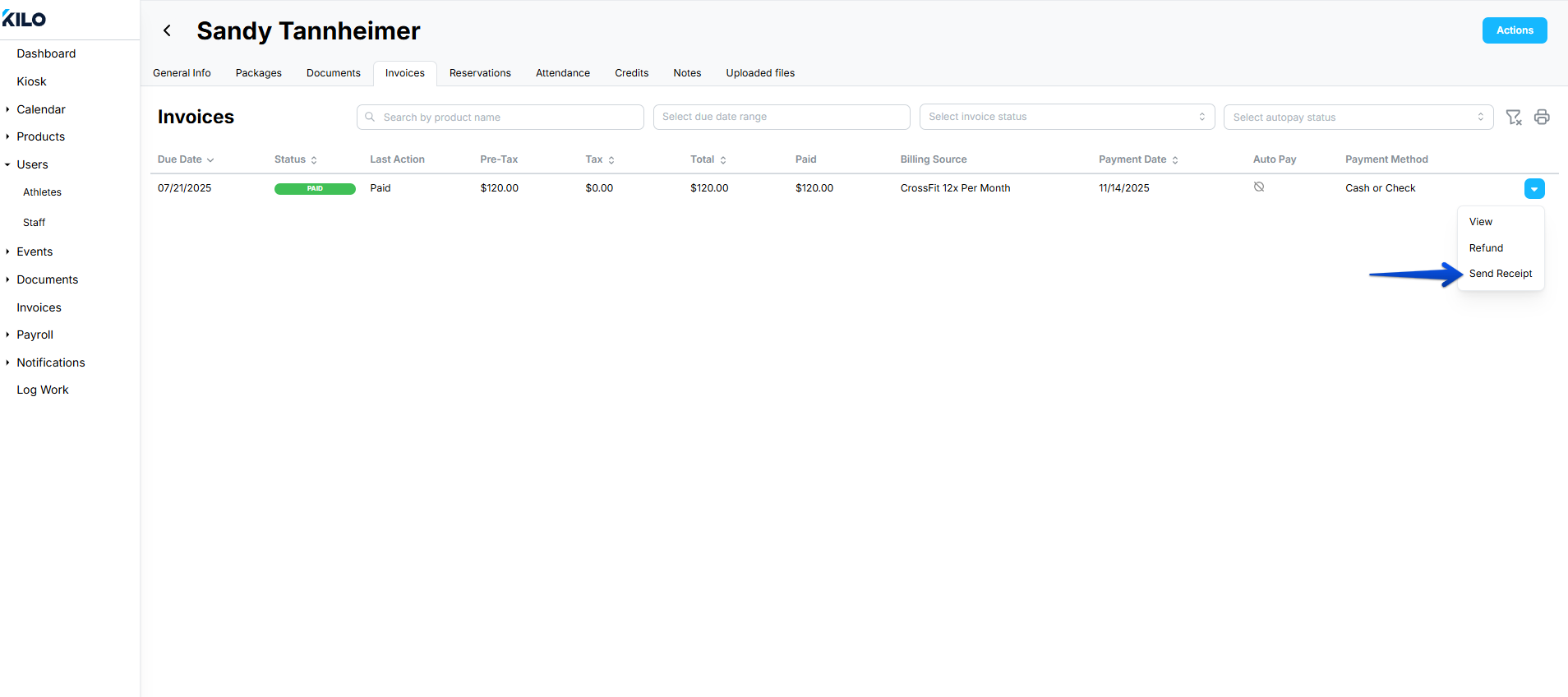
The athlete receives the receipt in their inbox.

The action tab sends receipts for invoices that have already been paid. To reach an athlete about an invoice that is still outstanding, use an automation flow instead.
How do I let athletes see their invoices in the Kilo Members app?
Athletes can only see their invoices once you turn the setting on for your gym. It is off until you enable it.
Log in to Kilo GMS.
Click your username in the bottom left of the screen.
Select Settings.
Go to Athlete App and click Edit.
Toggle on Allow athletes to see their invoices on the app.
Click Save.

Once the setting is on, athletes can find their invoices under the Documents tab in the Kilo Members app, where they can open an invoice, send it to themselves, or pay it.
How do I notify athletes about upcoming invoices?
Automation flows cover the deliveries that do not happen from the invoice screen.
For receipts on successful payments, use the [Athletes] Athlete Payment Successful notification in the Automation Flow Builder. It is sent by email or SMS.
For a heads up before a charge, build a flow using the Invoices upcoming trigger and send an email or SMS to the athletes it applies to.
Frequently asked questions
Can I send an athlete an invoice that has not been paid yet?
Not from the action tab on the invoice, which sends paid receipts only. To reach athletes about money that is still due, build an automation flow with the Invoices upcoming trigger and send the notice by email or SMS.
Where does the receipt get sent?
To the email address on the athlete's profile in Kilo GMS. If an athlete says a receipt never arrived, check the address on their profile before anything else.
Can athletes get a receipt automatically after every payment?
Yes, through the [Athletes] Athlete Payment Successful notification in the Automation Flow Builder. You choose email, SMS, or both, and it fires on every successful payment without anyone on staff needing to send anything.
Why can't my athletes find their invoices in the app?
The gym setting that exposes invoices to athletes is most likely still off. Go to Settings → Athlete App → Edit and toggle on Allow athletes to see their invoices on the app. Athletes see the Invoices tab under Documents after that.
Helpful tips
Turn on athlete invoice visibility during onboarding. It cuts down on receipt requests coming to your front desk.
Set up the payment success notification once and it covers receipts for every athlete from then on, so you only send manually when someone asks for a copy.
Keep email addresses current on athlete profiles. Every delivery method except in-app viewing depends on them.
Use SMS for upcoming invoice notices when your athletes are slow to read email. Payment reminders get opened faster than they get read.
When this feature is most helpful
An athlete asks for a copy of a receipt for reimbursement or taxes
A corporate or insurance program requires proof of payment
You want athletes to answer their own billing questions instead of calling the gym
A large renewal is coming up and you would rather athletes know before the charge lands
You are cutting down the number of receipts your staff sends by hand each week
If you have questions about invoice delivery in Kilo GMS, our Support team is happy to help. Reach us at hello@usekilo.com.