


You can see every class and appointment you have attended from the Reservations tab in the Kilo - Members app, and email yourself a copy of the record. This is useful when you want to check how often you have been training, or when you need proof of attendance for a reimbursement or a challenge.
What you can do
See a running count of the sessions you have attended, missed, and cancelled
Look back through your past classes and appointments
Check whether your gym has recorded you as attending
Open your full attendance history across your gyms
Email yourself a copy of the record
See your past bookings
Select Reservations at the bottom of the screen.
Select the Past tab.
Past Bookings opens with a summary at the top counting how many sessions you have Attended, Missed, and Cancelled. Below that, Details lists each past class and appointment with its date, time, length, and a status label.
Two status labels you will see most often:
Attended. Your gym has recorded you as attending.
Pending Attendance. The session has passed, but your gym has not marked attendance yet.
Open your attendance history
Select View Attendance History at the top of the Past tab.
Each entry shows the gym, the date and time, and whether you attended. Use the filter icon in the top right to narrow what you are looking at.
Email yourself a copy
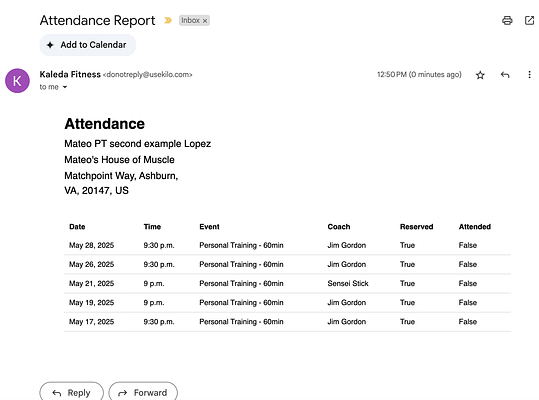
Select Send Report at the bottom of the Attendance History screen. A copy of your attendance record is sent to the email address on your account, where you can save it, print it, or forward it.
Frequently asked questions
How do I download or export my attendance?
Open your attendance history and select Send Report. The record is emailed to the address on your account, so you can save or forward it from there.
What does "Pending Attendance" mean?
The session has passed but your gym has not marked you as attending yet. Attendance is recorded when you check in or when your gym marks you off, so a recent class may sit as pending for a while. If it stays that way, contact your gym administrator.
Can I see attendance for a specific date range?
Use the filter icon at the top of the Attendance History screen. Set what you want to see before selecting Send Report, since the emailed copy matches what is on screen.
The email did not arrive. What should I do?
Check your spam or junk folder first. The report goes to the email address on your account, so if it is still missing, confirm that address with your gym administrator.
My attendance record looks wrong. Who do I contact?
Contact your gym administrator. Attendance is recorded when you check in or when your gym marks you as attended, so they are the only ones who can correct anything that does not match what you expect.
Can I see attendance for a family member?
Switch to their profile first, then follow the same steps. Attendance is specific to whichever profile you are currently using.
Helpful tips
Set your filters before selecting Send Report, since the email matches what is on screen
Check the summary counts at the top of the Past tab for a quick view of how your month is going
Email yourself a copy at the end of a challenge or a billing period, while the dates are easy to remember
Give your gym a little time before chasing a Pending Attendance label, since attendance is often marked after the session
Contact your gym administrator if something is missing, since only they can correct an attendance record
If you have questions about your account, your membership, or the classes at your gym, contact your gym administrator. They manage your account in Kilo and can help you directly.