


Once your ads are running, Meta Ads Manager shows you how they are performing and where to intervene. This article covers setting up your reporting view, reading the metrics that matter for gym lead generation, finding which images and copy are working, and editing your ad based on what you find.
Paid ads management is not on the Kilo menu, so we partnered with someone who does it properly. Colm at wedoyourpaidmarketing.com is our trusted paid ads partner and the expertise behind these articles. Need advertising connected to your Gym Lead Machine account? Email hello@usekilo.com. Want to talk about Meta Business Manager, ad accounts, or actually getting ads running? Reach out to Colm.
What you can review
Cost per click and click-through rate, to judge whether your creative is working
Total leads and cost per lead, to judge whether the campaign is worth its budget
Frequency, to see whether your audience is being oversaturated
Performance broken down by individual image, text, and headline
Which creative elements to keep, cut, and replace
Set up your reporting view
Go to https://adsmanager.facebook.com/adsmanager.
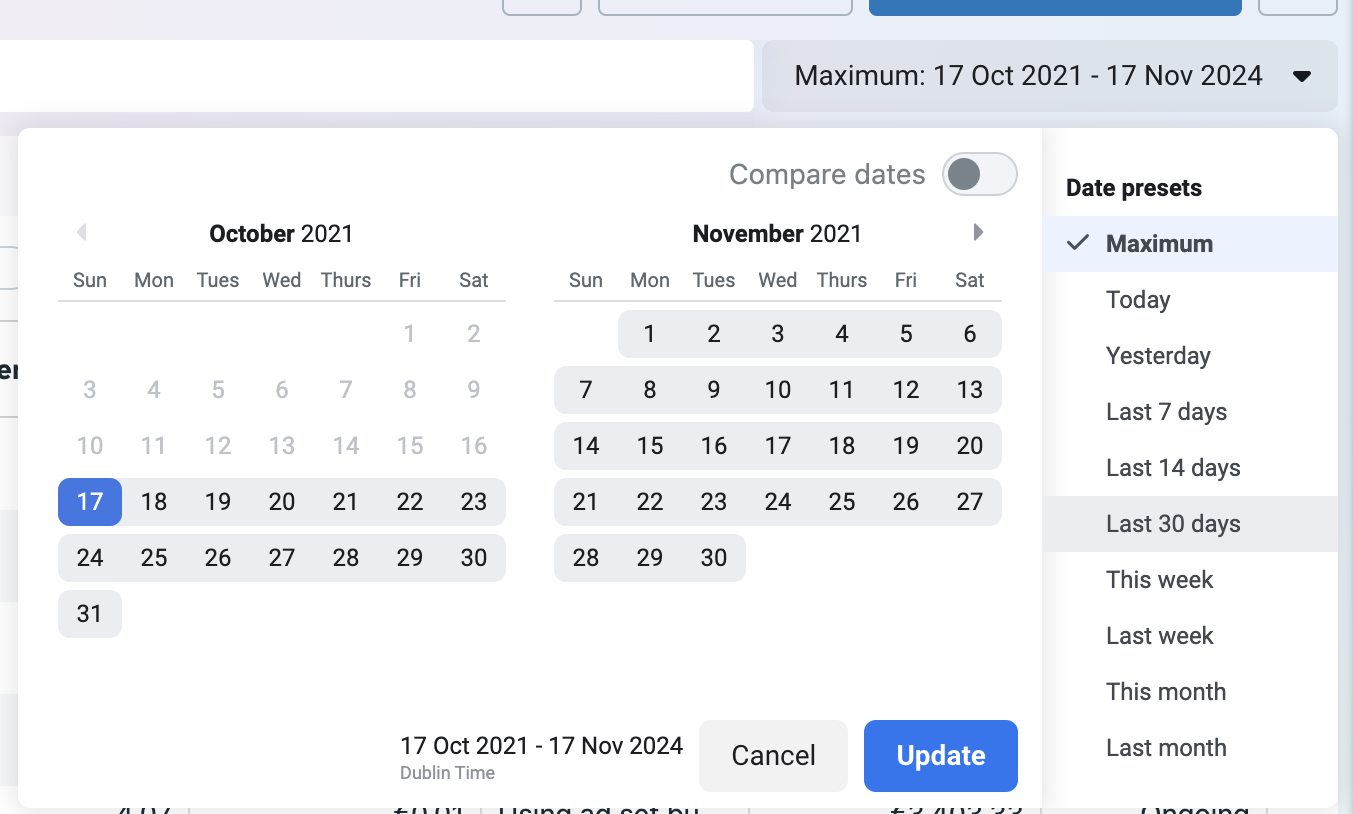
Set the date range to the Last 30 Days preset. Performance fluctuates through a month, so 30 days gives the most reliable picture.
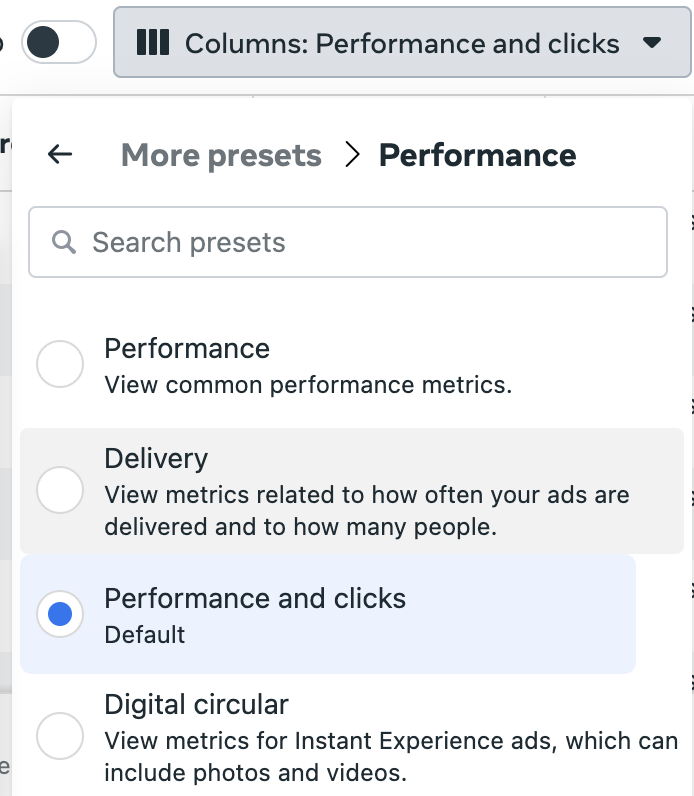
Select the Columns button, shown as three vertical bars.
Select Discover more column presets → Performance → Performance & Clicks.
What the metrics mean
Click metrics
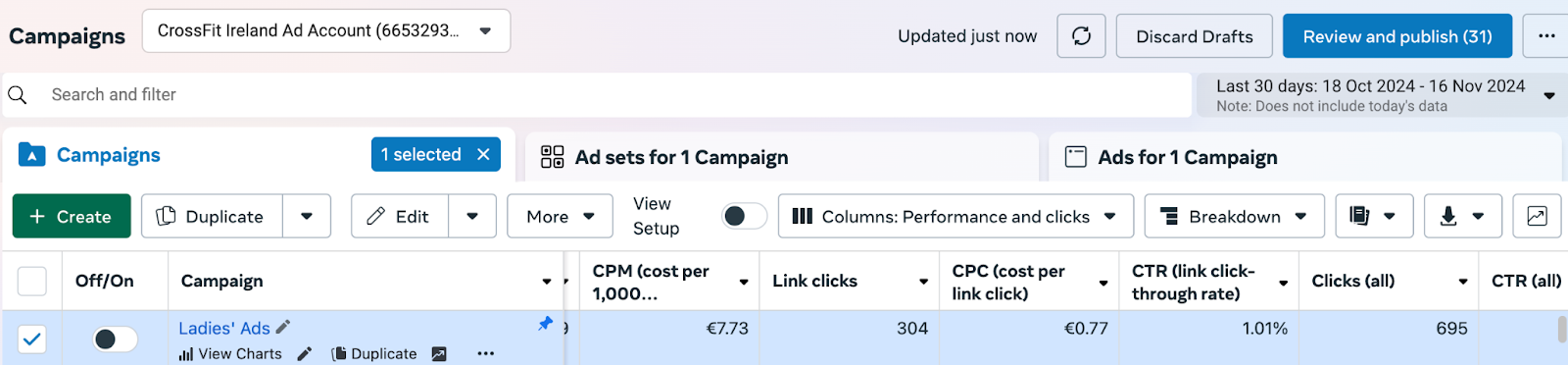
Scroll right until you see Link clicks, CPC, CTR, and Clicks (all).
Metric | What it tells you | Benchmark |
|---|---|---|
CPC (cost per link click) | How good your ad is at making people stop scrolling and click in. The most important of these four | Below $2 is good, under $3 is acceptable. Above $4 means your creative needs changing |
CTR (link click-through rate) | How competitive your market is for the same audience | 1 percent or above is a good return on fitness advertising |
Link clicks | How many people took the action the campaign was built for, which here means opening the Instant Form | No fixed benchmark. Compare against Results |
Clicks (all) | Every click on the ad, including people reading the caption or visiting your Page | No fixed benchmark. Always higher than Link clicks |
You are not only competing with other gyms. Any advertiser targeting your demographic competes for the same attention, so if you are advertising to women aged 25 to 55, cosmetics, travel, entertainment, and medical companies are bidding for the same audience.
Lead metrics
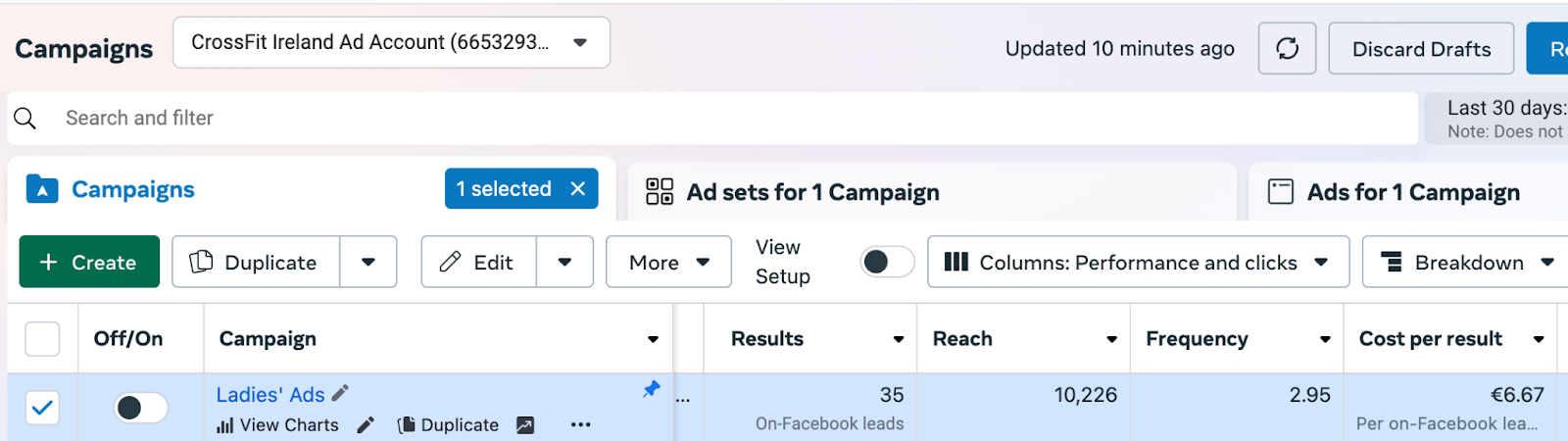
Scroll back left to see Results, Reach, Frequency, and Cost per result.
Metric | What it tells you | Benchmark |
|---|---|---|
Results | Total leads received. Should match your Gym Lead Machine dashboard | Around 10 percent of Link clicks. Roughly 1 in 10 people who open a form complete it |
Cost per result | Average price you paid per lead | $15 to $20 is standard for fitness leads. Under $10 is very good. Over $30 needs investigating |
Frequency | How many times on average someone sees the same ad | Above 3 and your audience may start tuning the ad out, pushing costs up |
If Results sit closer to 5 percent of Link clicks than 10 percent, people are opening your form and abandoning it. Adding a greeting that highlights your benefits, or that shows you understand the problem your client is trying to solve, gives them a reason to finish.
If Frequency climbs above 3, either widen your audience by expanding the age range or distance, or reduce your budget to slow how often the same people see the ad.
If Cost per result is over $30, it means either a very competitive market or an ad that is not resonating. Check CPC and the ratio of Link clicks to Results to tell the two apart.
Review which creative is working
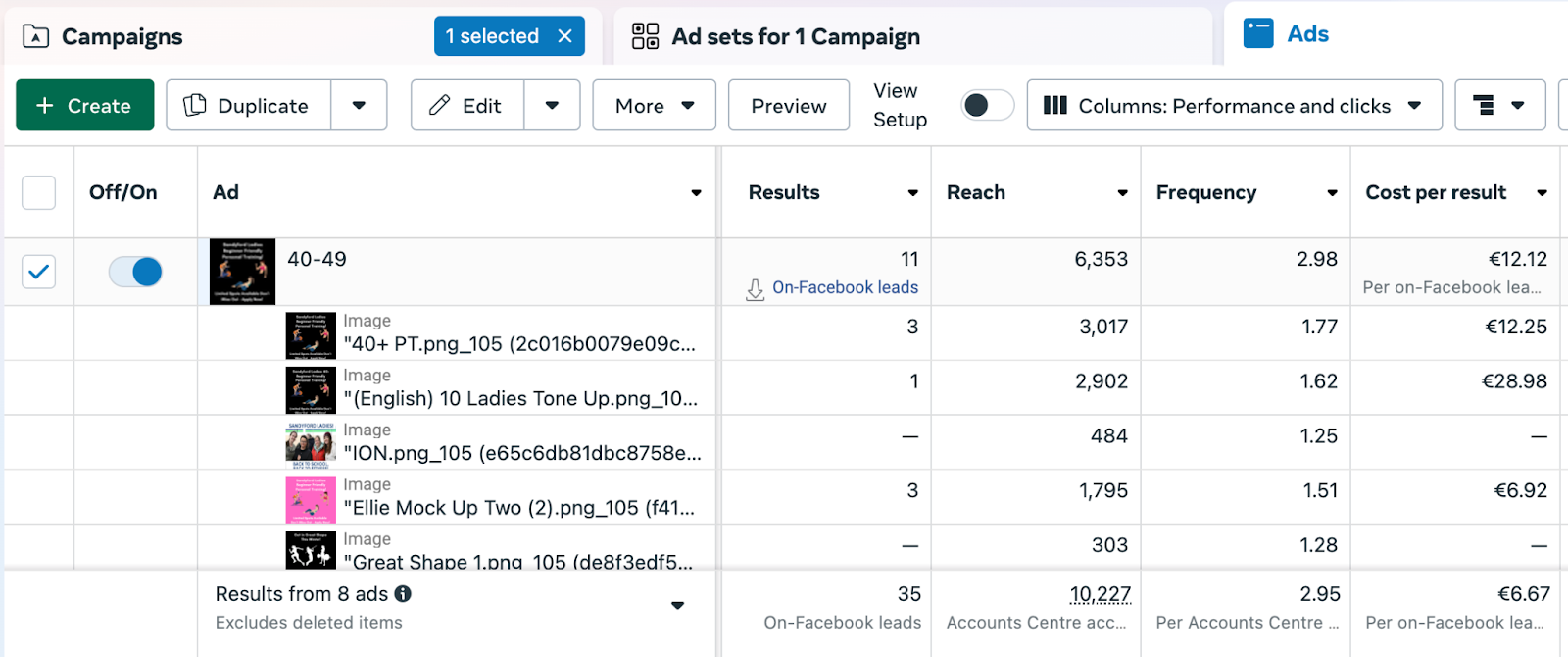
With Dynamic Creative, Meta recombines your images, text, and headlines, so you can see which individual elements are producing leads.
Select the campaign by clicking the tickbox beside its on and off switch.
Click the Ads for 1 campaign tab.
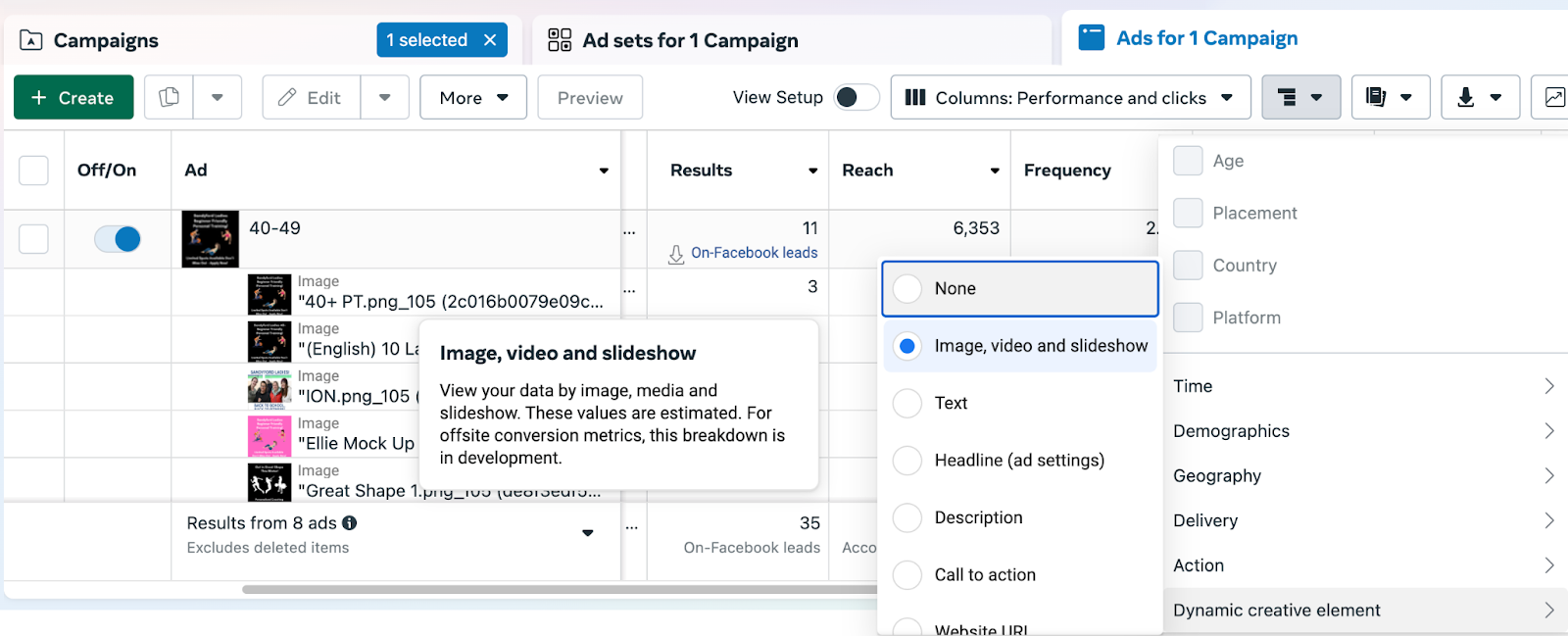
Click the Breakdown button, shown as three horizontal lines.
Select Dynamic Creative element → Image, video and slideshow.
Click anywhere on the page to close the menu.
Compare Results and Reach across the images. The images with the highest results are generating the most leads.
Repeat with Dynamic Creative element → Text and again with Headline to review your copy. Scroll down to see all options.
[IMAGE: The Breakdown menu set to Text] [IMAGE: Results broken down by text and headline]
Edit your ad
Hover over the ad name so the edit button appears.
Click the edit button.
Remove the images, text, and headlines that are not performing.
Keep the elements that are producing results.
Add new images, text, and headlines to test in their place.
Editing an ad follows the same fields as creating one, so the ad creation process is the reference for what each field does.
These metrics measure the efficiency of lead generation only. Lead nurture is the bigger determining factor in whether a campaign succeeds. The more you reach out to leads using a mix of human and automated contact, the higher your conversion rate.
Frequently asked questions
What is a good cost per lead for a gym?
Between $15 and $20 is standard for fitness leads, and under $10 is very good. Over $30 suggests either a very competitive market or an ad that is not connecting with your audience. Check your CPC and the ratio of link clicks to results to work out which.
My cost per click is high. What should I change?
Change your creative: the images, the copy, and the headline. A CPC above $4 means people are seeing your ad and scrolling past it. Break the campaign down by Dynamic Creative element to see which images and text are performing, then replace the ones that are not.
My frequency is above 3. What should I do?
Either widen your audience or reduce your budget. Expanding your age range or your distance radius gives Meta more people to reach, and lowering your budget slows how often the same people see the ad. Both reduce over-saturation.
People are opening my form but not completing it. Why?
Your form may be asking for commitment before giving a reason. If results are running closer to 5 percent of link clicks than 10 percent, add a greeting to the form that highlights your benefits or shows you understand the problem your client wants to solve.
How often should I review my campaign?
Every 14 days. That gives enough data to see a pattern without letting an underperforming ad run for a month.
Helpful tips
Always review on the Last 30 Days preset, since shorter windows exaggerate normal fluctuation
Treat CPC as your first diagnostic, because it tells you whether the problem is the creative
Compare Results against your Gym Lead Machine dashboard to confirm leads are arriving
Break down by image before breaking down by text, since images usually drive the biggest difference
Replace underperforming elements rather than pausing the whole ad, so the campaign keeps learning
Remember that a good cost per lead still depends on nurture to become a member
If you have questions about connecting your advertising to your Gym Lead Machine account, our Support team is happy to help. Reach us at hello@usekilo.com. For help reading your ad metrics, campaign strategy, or running your paid ads, contact Colm at wedoyourpaidmarketing.com.