
[Athletes] Add Classes & Appointments to Personal Calendar
We’re excited to share a new feature designed to make life easier for your athletes (and reduce no-shows for you 😉).
When an athlete reserves a class or books an appointment, they will receive a confirmation email. That email includes a calendar invitation, allowing them to easily add the event to their personal calendar.
This works with common calendar providers such as:
- Google Calendar
- Outlook Calendar
- Yahoo Calendar
Important: This Is Not a Calendar Integration
Athletes do not need to connect or integrate their calendar with Kilo.
Instead, this works the same way many other booking systems do. For example:
- When you book a flight, you receive an email that can be added to your calendar.
- When you buy event tickets, the confirmation email often includes an “Add to Calendar” option.
- When you book a haircut or appointment online, the confirmation email may create a calendar event automatically.
Kilo works the same way.
The confirmation email contains a small calendar file that tells email providers (like Gmail or Outlook) that the email contains an event. Depending on the athlete’s email settings, their calendar may:
- Automatically create the event, or
- Allow them to add it with one click.
What You Need to Enable
To send these calendar invitations, make sure the following Automation Flows are enabled:
- Athlete Reservation Added to Class
- Appointment Created (Single)
These flows send the confirmation email that contains the calendar event.
How Athletes Add Events to Their Calendar
Athletes have two possible experiences depending on their email provider and settings.
Option 1: Automatically Add to Calendar
Some email providers (like Gmail) may automatically recognize the event in the confirmation email and add it to the athlete’s calendar.
When this happens:
- The class or appointment appears automatically.
- The event includes the date, time, and details.
- No additional steps are needed.
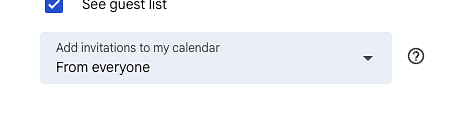
For Gmail users, events may not appear automatically if athletes have not enable permissions for the event to pop up automatically on their calendar. Instruct them to update settings to include the following, if that issue presents:
Option 2: Add With One Click
If the event is not automatically added, athletes can easily add it themselves.
They simply:
- Open the reservation confirmation email.
- Click the calendar icon or Add to Calendar option.
-
Choose their preferred calendar (Google, Outlook, Yahoo).
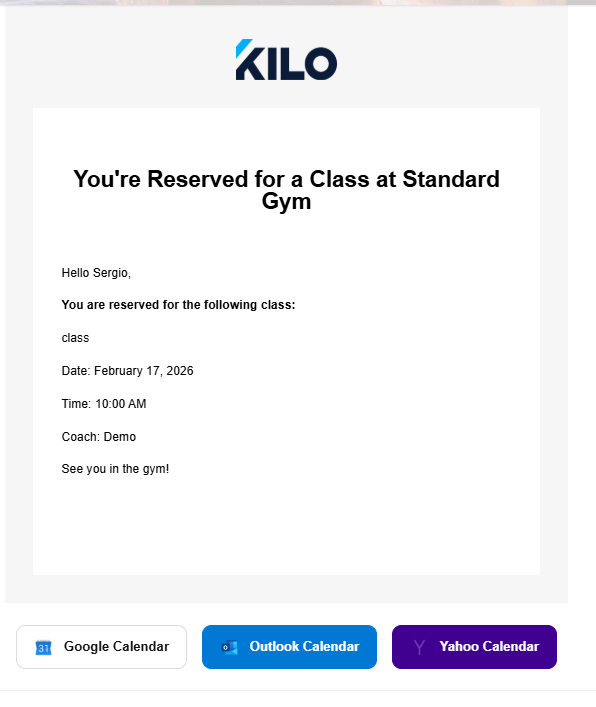
The event will then be saved to their personal calendar.
Important Note About Bulk Reservations
Calendar events are only created for individual reservations.
If an athlete books many classes at once, calendar events will not be created for each session automatically. This prevents athletes’ calendars from being flooded with dozens of events at once.
Why This Feature Helps
Adding reservations to personal calendars helps athletes:
- Remember upcoming classes
- Plan their schedules more easily
- Avoid missing booked sessions
For gym owners, that often means fewer late cancellations and no-shows.
If you have any questions about enabling or using this feature, our team is always happy to help! Email Support at hello@usekilo.com