
Provider-Based Day View in the GMS Schedule
We’re excited to share a highly-requested improvement to the Kilo Gym Management Schedule!
Starting Tuesday, February 10, the Day view on desktop for Owners and Staff will now display a provider-based schedule layout, replacing the previous list-style view.
This update makes it much easier to see what’s happening across your coaches and service providers at a glance.
What’s Changing?
Previously, the Day view showed a simple list of scheduled classes and appointments.
Now, on desktop, the Day view will be upgraded to a provider-based view, where each coach or provider has their own column in the schedule.
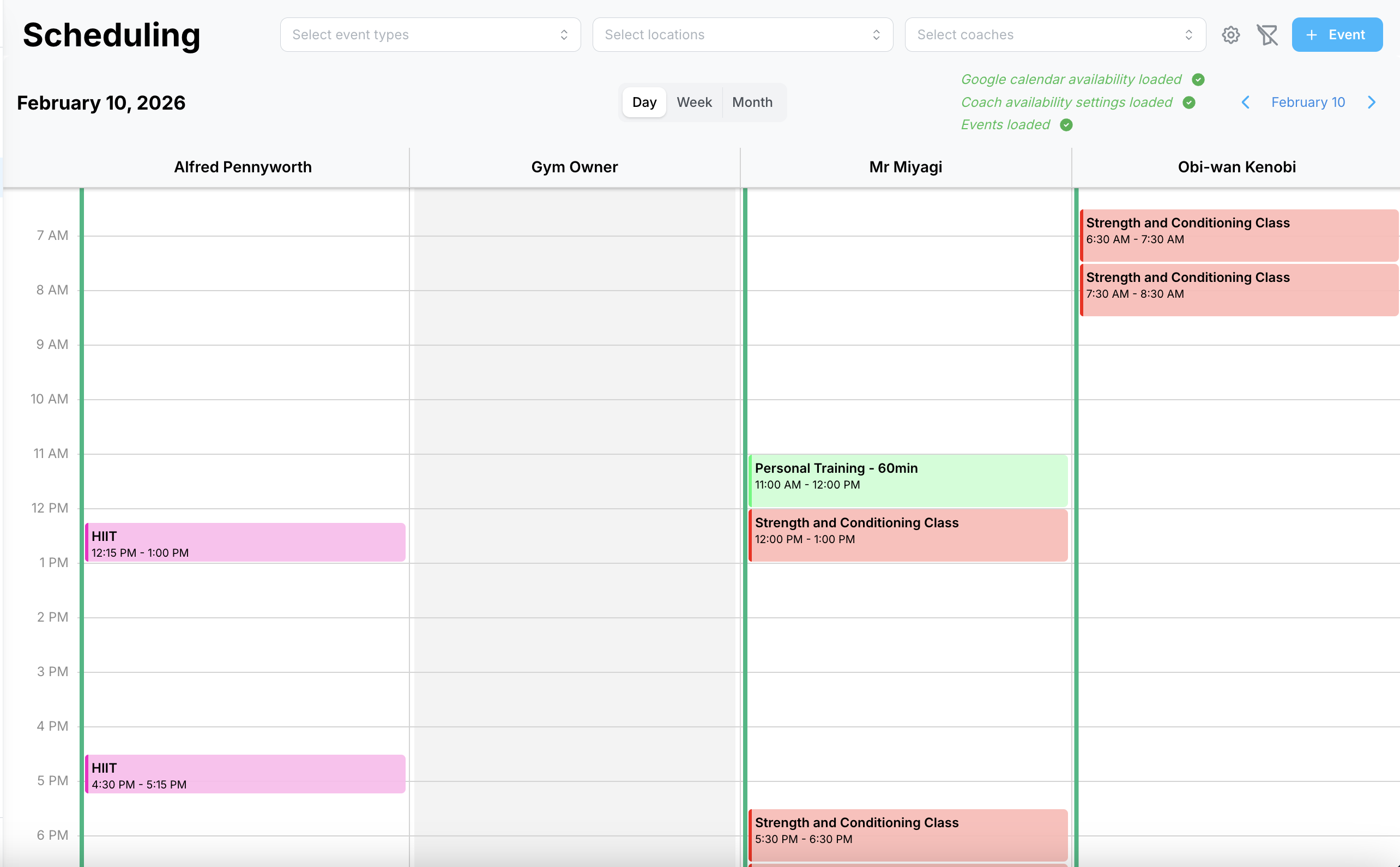
This layout helps you quickly understand:
- Who is booked
- Who is available
- What’s happening across the full staff schedule
For example, if you need to book someone for an 11am personal training appointment, you can easily see which providers are free at that time.
In the screenshot above, the gym owner is blocked off for the entire day, making their availability instantly clear.
How to Access the Provider-Based View
The provider-based layout is available when viewing the schedule on a laptop or desktop screen size.
To find it:
- Go to Schedule
- Select Day view (top of the calendar)
That’s it — the provider-based layout will appear automatically on desktop.
Mobile View Remains the Same
Due to screen width constraints, the mobile Day view will still display the original list-style format.
This ensures the schedule remains easy to navigate on smaller devices.
No Impact to Your Website Calendar
This update only affects the internal schedule view for Owners and Staff.
Your embedded calendar on your gym website will not be impacted and will continue working exactly as it does today.
If you have any questions or want help navigating the new layout, feel free to reach out to the Kilo Support team at hello@usekilo.com.