
Pay Coaches Based on Session Revenue with Commission-Based Pay Rates
You can now pay coaches based on a percentage of the revenue they generate using Commission-Based (Percentage) Pay Rates in Kilo GMS.
This feature allows you to automatically calculate coach payouts based on the value of each session and the number of athletes who attend. It works especially well for:
- Personal training
- Specialty programs
- Small group training
- On Ramp sessions
- Revenue-share coaching models
Instead of paying a flat rate or hourly wage, you can reward coaches based on the actual revenue they help generate.
How Commission-Based Pay Works
The system calculates payouts in three simple steps:
- A Session Value is created from your package pricing
- A Percentage Pay Rate is assigned to a coach
- The system multiplies session value by the percentage for each checked-in athlete
Example:
- Session value: $100 per athlete
- Coach commission: 40%
- 5 athletes attend
Coach payout = $200
Kilo calculates this automatically and displays it in the payroll report.
Step 1: Add Session Value to Your Packages
Session value is the foundation of commission-based pay.
It represents the pre-tax value of each session or credit in a package.
How to Set It Up
- Go to Products → Packages
- Create or edit a Time-Based or Credit-Based Package
- Set your Attendance Rules
- Add your Billing Plan
You will now see Session Value displayed under the Billing Plan.
For existing packages where you want commission-based pay to apply, follow these steps:
Go to Products → Packages, select the existing package, click Edit Billing Plans, set the Session Value, and click Save.
Important: The system will not automatically calculate session values for existing billing plans, so this must be set manually for each applicable package.
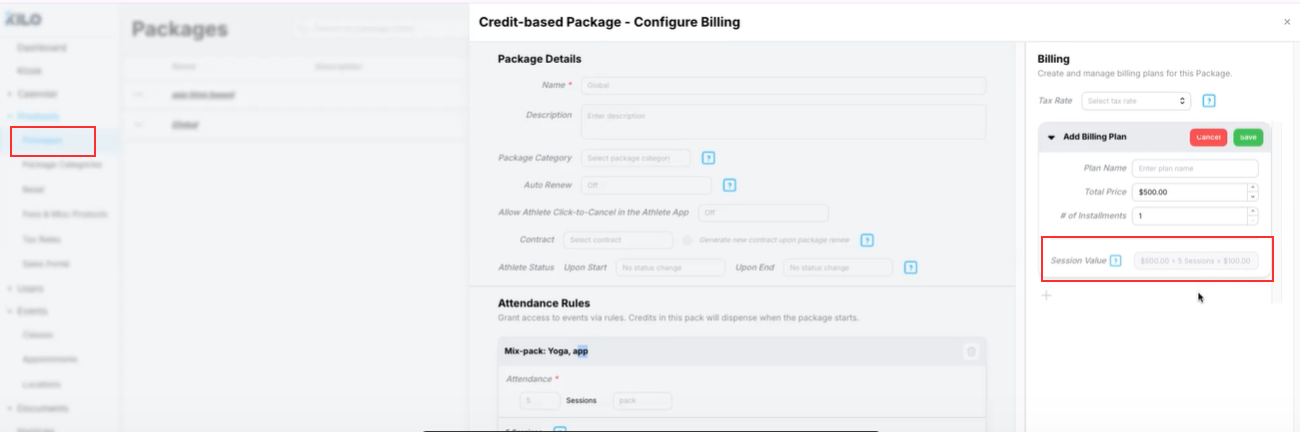
Example:
- Package price: $1,000
- Total sessions: 10
- Session value: $100 per attendee
Kilo calculates this automatically based on:
Total package price ÷ total sessions = session value
This value is used to calculate coach payouts.
Step 2: Create a Commission (Percentage) Pay Rate
Next, create a pay rate for your coaches.
How to Create a Percentage Pay Rate
- Go to Payroll → Pay Rates
- Click New Pay Rate
- Select Percentage-Based Pay Rate
- Enter the commission percentage
Examples:
- 40%
- 50%
- 60%
- Click Save
The pay rate is now ready to use.
Step 3: Assign the Pay Rate to a Coach
Once the pay rate is created:
- Assign it to a Coach
- Select the Event Type (such as Personal Training or Specialty Program)
Kilo will now calculate payroll automatically whenever that coach runs a session and athletes check in.
How Payroll Is Calculated
When a session occurs:
- Kilo looks at each checked-in athlete
- Finds their package session value
- Applies the coach’s percentage
- Calculates the total payout
Important:
- Only checked-in athletes count toward payout
- Rounding happens at the final total to ensure accuracy
- The system calculates everything automatically
This removes the need for manual payroll calculations.
View Commission and Session Value Details
You can see exactly how payouts are calculated in the payroll report.
Step 1: Open Payroll Report
- Go to Payroll → Staff Payroll Report
- Select a pay period
- Generate a report if needed
Step 2: View Payout Breakdown
- Find the session
- Click the Payout amount
A Payout Breakdown window will open.
What You’ll See in the Breakdown
The payout breakdown shows:
- All checked-in athletes
- Package name
- Billing plan
- Billing plan price
- Session value for each athlete
- Coach percentage
- Final payout calculation
This provides full transparency into how payroll was calculated.
Why the Payout Breakdown Matters
This helps gym owners:
- Verify payroll accuracy
- Understand revenue per session
- Track coach performance
- Build trust with coaching staff
- Answer payroll questions quickly
Everything is visible and easy to review.
Important Notes
- Session value is automatically calculated from package pricing
- Commission pay only applies to events with checked-in athletes
- Commission pay cannot be used for Other Work (such as admin or non-session tasks)
- Only hourly pay rates can be used for Other Work
- Percentage pay applies only to sessions tied to package credits or billing plans
- Payroll updates automatically as sessions occur
If you have further questions about how to pay coaches based on session revenue with commission-based pay rates, please reach out to Support at hello@usekilo.com.